Basics
Offline Speech Recognition: What Works Locally and Where the Limits Are
What offline speech-to-text actually is, which tasks it handles right on your device without the internet, and where the real boundary of local processing lies.
When you dictate a note to your phone or tap "voice input" in your browser, something happens that people rarely think about. Your voice travels to someone else's server, gets turned into text there, and comes back. Convenient. Right up until you find yourself with no connection, inside an environment with strict data rules, or simply stop to wonder where the recording of your voice now lives and who can access it.
Offline speech recognition works differently. The entire path from microphone to finished text runs right on your own computer. Below we'll break down what that means in practice and where the real boundary of "local" lies, because that boundary is often not where the marketing draws it.
What "Offline" Really Means
"Offline" isn't about an app that has forgotten how to update. It's about where your voice gets processed.
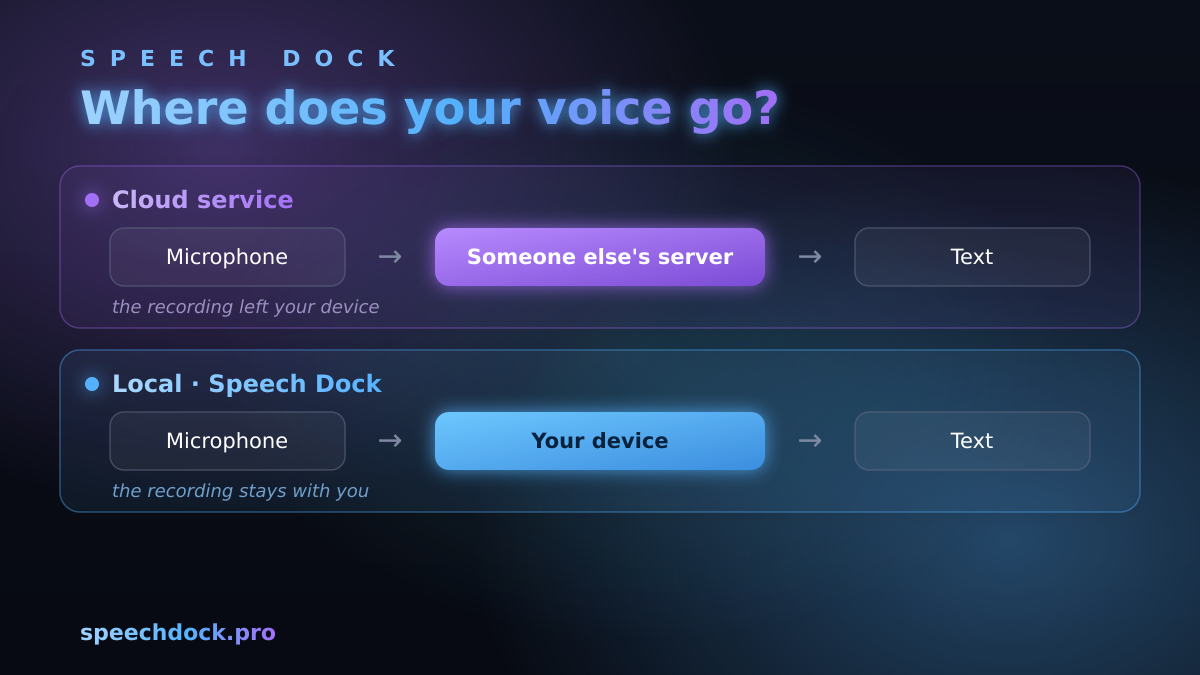
Compare two paths. In the cloud version, audio from your microphone goes to the service's server, gets recognized there, and comes back to you as text. Without a connection nothing works, and you have no control over what happens to the recording on the other end. In the local version, recognition runs right on the device, the text is ready instantly, and the connection isn't needed for the dictation itself at all.
That leads to the key point: privacy comes by default. Not because someone promised "we won't store your data," but because there's simply nowhere to send it. We describe how this works in Speech Dock in more detail on our privacy and security pages.
Where the Boundary of Local Processing Lies
The honest answer: not everything in an app has to work offline, and that's fine. The only question is what stays on the device and what occasionally needs a connection.
Everything that touches your voice and your text always stays local. That means capturing audio from the microphone, converting speech to text itself, the further handling of the finished text (adding punctuation, formatting), and the history of your recordings. None of it leaves your device.
A connection may be needed only for things that have nothing to do with the content of your recordings: the first install of the app and downloading language data, checking for updates, and activating a paid license.
As you can see, the boundary runs exactly along the content. Downloading the app over the internet is a one-time thing: you install it once and forget about it. But after installation, your voice and your transcripts never go anywhere, so you can dictate completely offline.
What Ordinary Services Do With Your Recording
To a cloud service, your voice is input data for someone else's infrastructure. And even when the service is well-intentioned, a few questions remain that you have no guaranteed answer to. How long is the recording and its transcript kept? Is your voice used to train someone else's systems? Who has access to the data, and in what jurisdiction do the servers sit?
Local processing removes these questions all at once. The data never leaves the device, so there's nothing to answer for. For personal notes that's simply pleasant. But for work documents, client correspondence, or any sensitive information, it's often a hard requirement, without which the tool can't be put to use at all.
How to Choose an Offline Solution: What to Look For
Not every app that calls itself "local" actually keeps your voice with you. A word in a description costs nothing, so it's easier to check for yourself. Here's what I'd look at.
- Does dictation work without a connection. The most honest test: turn off the internet and try to dictate some text. If recognition keeps working, the processing really does run on the device.
- Where the text goes. A good desktop solution sends the recognized text straight into the active window (editor, messenger, browser) instead of making you copy it by hand out of its own little box.
- Support for your platform. Check that the app runs natively on your system, not through some shim layer. Speech Dock, for example, is built for Linux and macOS.
- What happens to the history. It's worth confirming whether the history of your recordings is stored on the device and whether you can delete it whenever you want.
- Transparency about the network. It's fine for an app to go online for updates and activation. Sending your audio there is not. These two things matter to tell apart, and they're often deliberately blurred together.
If the desktop scenario on Linux, with its zoo of windowing systems, is exactly what you care about, there's a separate deep dive: voice input on Linux: X11, Wayland, and the workflow. And if you're choosing between a ready-made app and building your own solution on a low-level engine, there's an article for that: Speech Dock or Whisper.cpp.
In Short
So "offline" here isn't a pretty word on a landing page but something you can actually verify: turn off the network, dictate a paragraph, and it either works or it doesn't. If privacy is not a nice bonus for you but the condition under which the tool can be used at all, local processing is the most direct way to get it. Let the rest (updates, the license) go online as it pleases; it has nothing to do with your voice.